Turn your smartphone into a professional GPS receiver
Trimble Catalyst — scalable GNSS accuracy from sub-metre to 1 cm survey grade, for Android & iOS. Connect to theTrimble DA2 – GNSS receiver for connections to the Catalyst Service

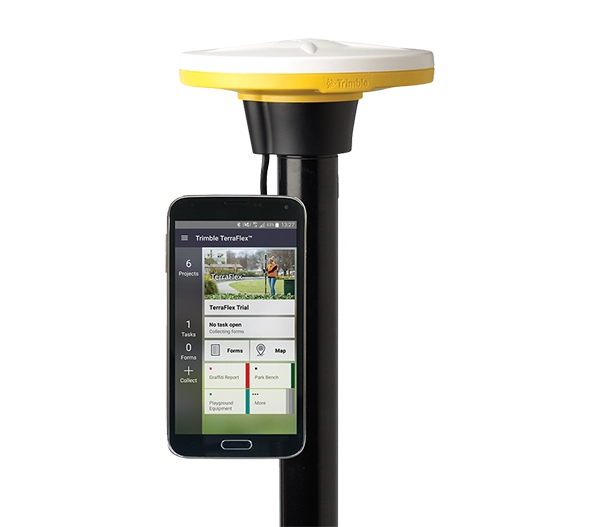

Trimble Catalyst — scalable GNSS accuracy from sub-metre to 1 cm survey grade, for Android & iOS. Connect to theTrimble DA2 – GNSS receiver for connections to the Catalyst Service
Trimble Catalyst — scalable GNSS accuracy from sub-metre to 1 cm survey grade, for Android & iOS. Australia’s authorised Trimble dealer.
3–10m
Typical smartphone
location error
100×
Accuracy gain with
external GNSS receiver
Your smartphone’s built-in GPS was designed for everyday navigation — not professional fieldwork. In the field, that 3–10 metre error means wrong coordinates, rework, and wasted time.
A small external receiver connects to your Android or iOS device via Bluetooth and delivers sub-metre to centimetre-level precision — with no new phone, no expensive dedicated hardware.
Trimble Catalyst pairs with your existing device and gives arborists, environmental scientists, GIS professionals, and site contractors the accuracy their work demands — through a flexible subscription model.
<1cm
Achievable precision
with Trimble Catalyst
0
New devices needed.
Pairs via Bluetooth
Local stock and an Australian support team ready to help — not an overseas help desk.


Centimetre-level accuracy without a full rover kit. Fast to set up, light to carry — accurate enough for boundary and stakeout work direct to your Android device.

Turns a smartphone into a professional asset mapping tool. Capture sub-metre locations for utilities, infrastructure, and environmental assets — straight into existing apps.

Precise positioning from the moment you arrive. Setout, as-built capture, and site verification — no base station, no bulk gear, no delays for site managers and contractors.

Repeatable, defensible positioning for vegetation plots, sampling sites, and monitoring locations. Lightweight enough to take anywhere in the field.

Map trees, record inspections, manage land assets across large properties with sub-metre GPS on the device already in your pocket — faster, more accurate, audit-ready.
Precise ground control points, captured quickly in the field. Improve the accuracy of every aerial survey without adding extra equipment to the kit.
Centimetre-level accuracy without a full rover kit. Fast to set up, light to carry — accurate enough for boundary and stakeout work direct to your Android device.

Turns a smartphone into a professional asset mapping tool. Capture sub-metre locations for utilities, infrastructure, and environmental assets — straight into existing apps.
Precise positioning from the moment you arrive. Setout, as-built capture, and site verification — no base station, no bulk gear, no delays for site managers and contractors.
Repeatable, defensible positioning for vegetation plots, sampling sites, and monitoring locations. Lightweight enough to take anywhere in the field.
Map trees, record inspections, manage land assets across large properties with sub-metre GPS on the device already in your pocket — faster, more accurate, audit-ready.
Precise ground control points, captured quickly in the field. Improve the accuracy of every aerial survey without adding extra equipment to the kit.
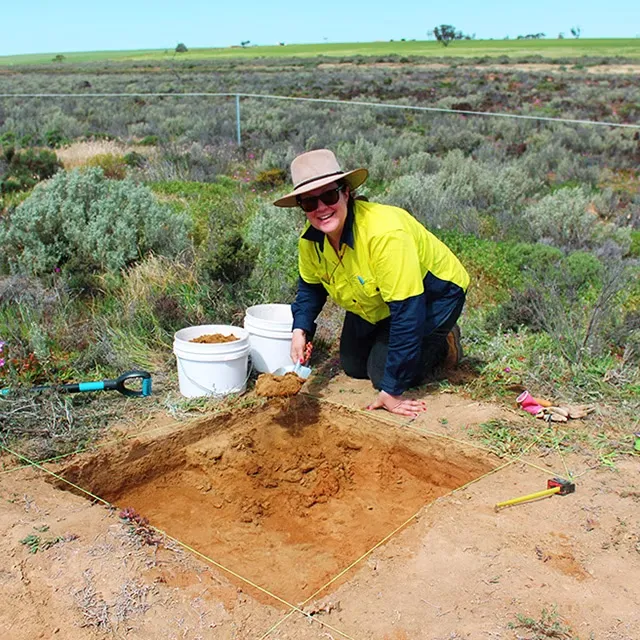

“Catalyst makes striking the balance between progress and preservation so easy I don’t understand why every archaeology company isn’t using it.”
Learn more > Connecting to the DA2
Learn more > Catalyst Subscription Tiers
Learn more > Location sharing with other apps
NETWORK COVERAGE & LOCAL SUPPORT
Coverage, connectivity, and on-the-ground support across Australia and New Zealand — including the questions that matter most for remote and rural operations.
Strong cellular coverage. Full Catalyst performance achievable. All major AU/NZ cities supported.
Good coverage across primary farming regions. Catalyst widely used in precision ag. Check TCH Hub for specific areas.
Cellular coverage thins significantly. Software requires connectivity — see remote area guidance below.
The Catalyst service works with Trimble‑provided correction services using the Trimble Corrections Hub.
The Trimble Corrections Hub bundles access to Trimble VRS Now™ and Trimble RTX correction services.
Trimble Corrections Hub dynamically selects the appropriate correction service based on the environment, availability, and your subscription level.
WORKS WITH YOUR APPS
Catalyst pairs with the apps your team already uses — no hardware swap required. Select a use case to see compatible apps.
Capture accurate points, lines and polygons in the field — synced to your GIS the moment you’re back in range.

Cloud-synced forms keep your whole team capturing and updating assets from a single source of truth.

Upgrade your existing Esri workflows with centimetre-accurate positioning on any Android device.

Empowers onsite teams to locate, capture, & update geographic infrastructure data in real time.

Purpose-built mobile GIS collection for utilities and local government asset management.
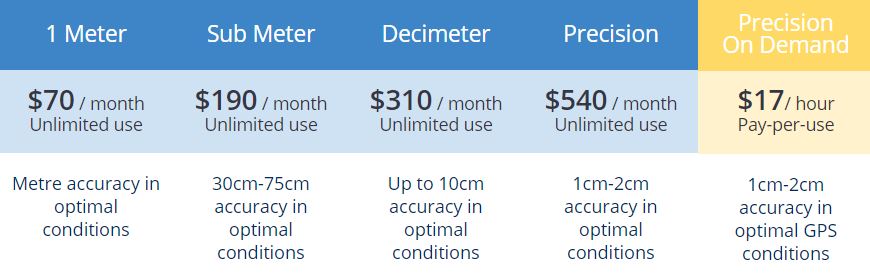
SUBSCRIPTION TIERS
Set centimetre-accurate ground control points before your drone takes off — no dedicated GNSS rover needed.
A practical guide to six common project scenarios — how Catalyst compares to alternatives, and where it fits best in your workflow.
Trimble Catalyst is a software-defined GNSS receiver that turns any Android or iOS device into a professional positioning tool — without the upfront cost of dedicated hardware.
This guide walks through six common scenarios to help you decide when Catalyst is the right choice, when it may fall short, and how it compares to the alternatives.
SCENARIO 01
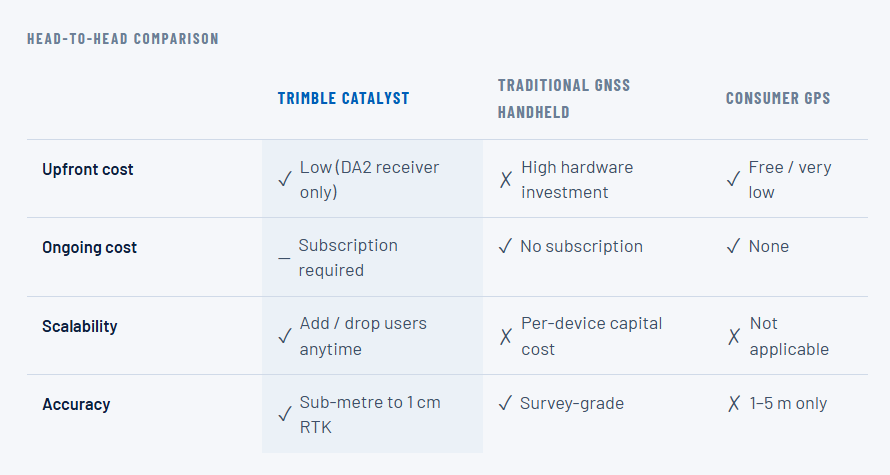
Trimble Catalyst was built around this use case. Instead of a large capital outlay on dedicated GNSS hardware, you pay for a lightweight DA2 receiver and then subscribe at the accuracy level you actually need — hourly, monthly, or annually.
Unused capacity doesn’t waste budget. Traditional GNSS handhelds typically require significant upfront capital; Catalyst lets you offset positioning costs directly against individual projects and scale spend up or down as workloads change.
Best for teams managing capital budgets or offsetting costs per project
SCENARIO 02
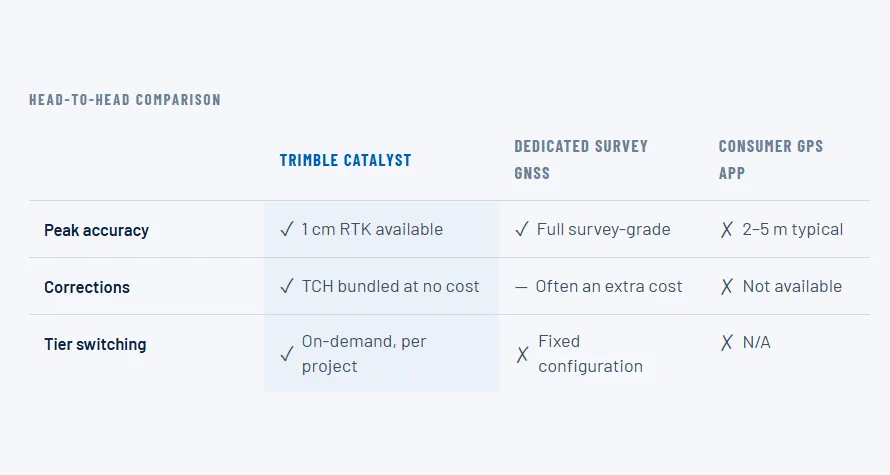
Catalyst delivers centimetre-level accuracy (1 cm RTK) through the DA2 receiver, with tiered subscriptions from 60 cm sub-metre through to survey-grade 1 cm precision.
The Trimble Corrections Hub (TCH) is bundled at no extra cost, automatically selecting between SBAS, Trimble RTX, and VRS Now — so you get the best available correction without manual configuration.
If your project demands centimetre accuracy today but only sub-metre tomorrow, you can switch tiers on demand.
GIS mapping, asset capture, engineering survey, stakeout
SCENARIO 03
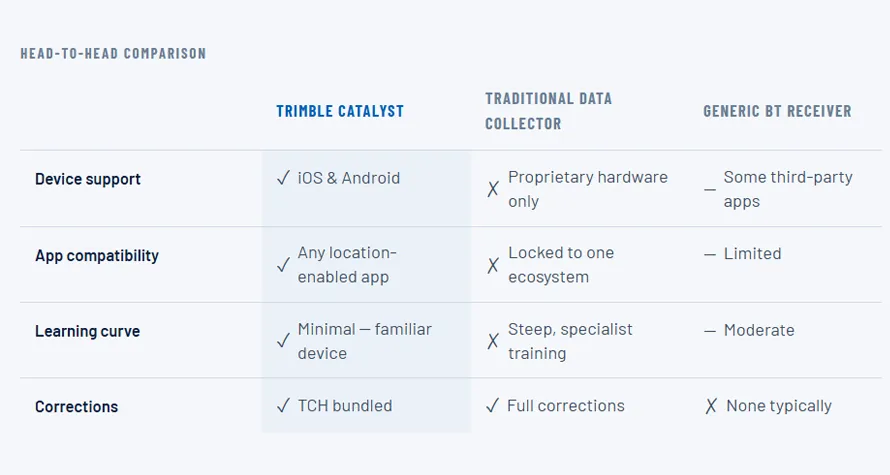
Catalyst is designed around the device your team already carries. The DA2 receiver connects wirelessly to any Android or iOS device, and works with any location-enabled app — including Esri ArcGIS Field Maps, Trimble TerraFlex, and hundreds of third-party GIS tools.
No proprietary data collector required. Field teams already familiar with their mobile device can be productive from day one, with no specialist GNSS expertise needed.
Works with Esri ArcGIS Field Maps, Trimble TerraFlex, and location-enabled apps
SCENARIO 04
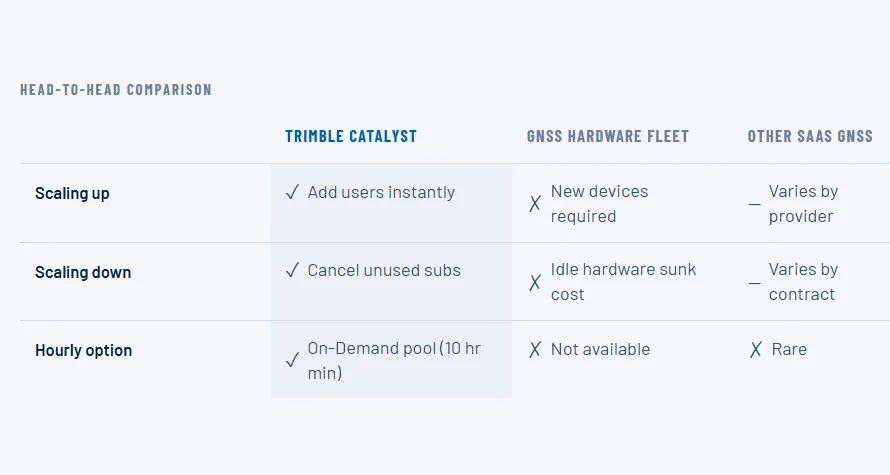
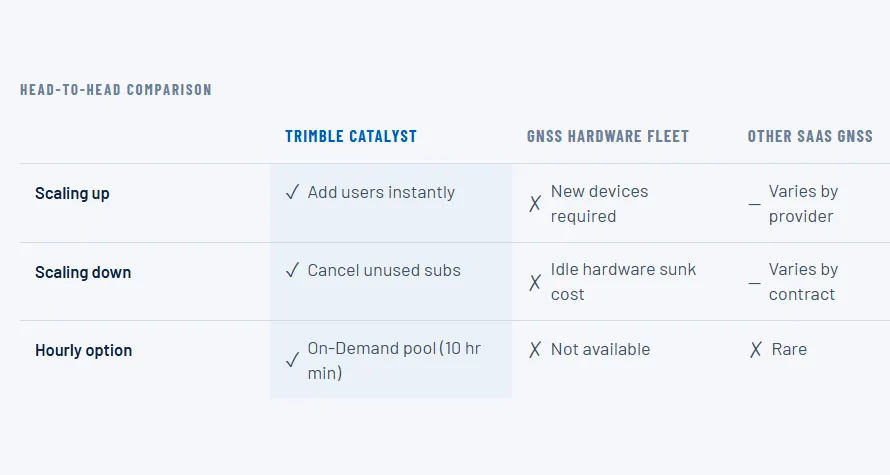
Catalyst licenses are per-user and scale freely — add users in peak season, let them lapse in the off-season.
The On-Demand hourly plan (from 10-hour blocks, shared across users) suits unpredictable workloads; monthly plans fit short-term projects; annual plans suit steady operations.
Unlike per-device hardware competitors, scaling in either direction costs nothing extra.
Scale users up in peak season, scale down in the off-season
SCENARIO 05
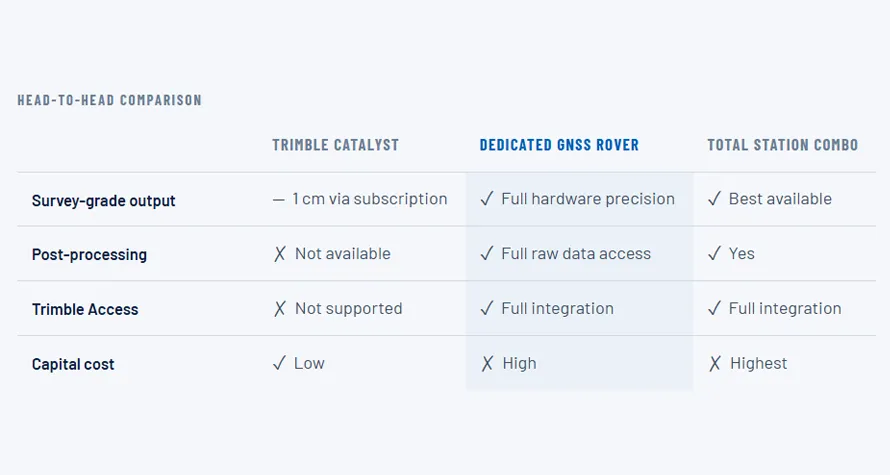
For full-time registered surveyors running boundary surveys, complex control network work, or high-volume RTK stakeout from a base station, a dedicated total station or GNSS rover (such as the Trimble SPS or R-series) may be more appropriate.
These provide hardware-level reliability, fully integrated Trimble Access workflows, and post-processing options not available in Catalyst. That said, Catalyst’s Precision tier (1 cm) and centimetre On-Demand hours make it a credible secondary device or lightweight field companion for surveyors who need a cost-effective backup.
Boundary surveys, control networks, high-volume RTK stakeout
SCENARIO 06
Catalyst’s Trimble Corrections Hub (TCH) provides worldwide corrections via Trimble RTX (satellite-delivered), which works online or offline and covers most of the globe — so you’re not dependent on a local VRS network. RTX delivers reliable positioning without mobile internet.
For very remote sites, RTX corrections may deliver slightly lower peak accuracy than RTK over VRS Now. Users on Sub-metre, Precision, or Decimeter tiers can also configure third-party correction sources as a fallback. For operations requiring the absolute highest accuracy in areas with no connectivity, a local base station setup may still have an edge.
Remote sites, regional Australia, international deployments
What is Trimble Catalyst?
Trimble Catalyst is a subscription service that allows you to generate and use centimetre-accurate GPS positions on your smartphone or tablet. As a Catalyst subscriber, you can choose to be automatically charged monthly on an unlimited use plan, or alternatively pre-pay for on-demand access on an hour-by-hour basis.
Do I need GPS Correction services to use Catalyst?
Trimble Catalyst uses GPS corrections to generate highly accurate GPS positions. Your subscription includes access to the Trimble Corrections Hub, which lets you use Trimble and Trimble partner correction services. Trimble Corrections Hub coverage is available in many parts of the world but is not yet available worldwide. Check the latest coverage here. If the Trimble Corrections Hub does not provide suitable coverage in your location, you will need to provide your own local correction service.
Can I share my subscription with others?
Yes, you can share a Trimble Catalyst subscription, but the method depends on the plan type. Catalyst On Demand hours can be shared among any number of users from a common pool.
How long does setup take?
Setting up the Trimble Catalyst DA2 receiver is designed for speed, often taking just a few minutes to get connected in the field, provided your software is already installed. The process involves mounting the hardware, connecting via Bluetooth, and signing into the app.
Does it work with my existing apps?
Yes, Trimble Catalyst works with a wide range of existing GIS, mapping, and data collection apps on both iOS and Android, provided they are location-enabled. The system uses the Trimble DA2 receiver (or older DA1) to provide high-accuracy positioning directly to your favorite apps, replacing the lower-accuracy internal GPS of your phone or tablet.
How do I manage my account?
You can see your subscription and manage your payment details in My account section. You can manage your licences and assigned users for your subscription at the Trimble License Manager application.
Does Trimble Catalyst need internet?
Yes, Trimble Catalyst requires an internet connection to initially download license files and to function at high-accuracy levels using internet-based correction services (like VRS). However, it can work offline for up to 30 days once a subscription is initialised, or use Trimble RTX satellite-delivered corrections when internet is unavailable.
What Android device do I need?
Trimble Catalyst requires an Android device (phone or tablet) running Android 5.0 or higher with Bluetooth, though Android 8.0+ and a 64-bit processor are recommended for optimal performance. The device must support the Trimble Mobile Manager app, which pairs with the DA2 GNSS receiver via Bluetooth for high-accuracy positioning.
Can I try before I commit?
Yes, reach out to us for a demo.
How can I pay for Catalyst?
Credit and Debit cards:
We accept Visa, Mastercard, and American Express cards. Cards must be enabled for recurring e-commerce transactions to work with Catalyst.
Prepaid Cards:
If you have a prepaid card with a Visa, MasterCard, or American Express logo, you can enter your card’s information on our payment page. If the bank that issued the card approves our authorisation request, we will accept this card for payment.
How do I resolve payment problems?
If there is a problem with your payment method, your access to the service may be disrupted. To resolve the issue, sign in to your account and update or change your payment method. In most cases, this will resolve the issue. If you’re still having trouble updating your account with new payment information, please try a different payment method, or contact your financial institution to ensure your payment information is up to date and supports e-commerce transactions. If you have confirmed that your payment method is listed under ‘How can I pay for Catalyst?’ above, and your payment method is still not being accepted, contact us for further assistance.
AUTHORISED PARTNERS
COMPANY
LEGAL
ADDITIONAL
HELP